
MedTimes: A UX Case Study
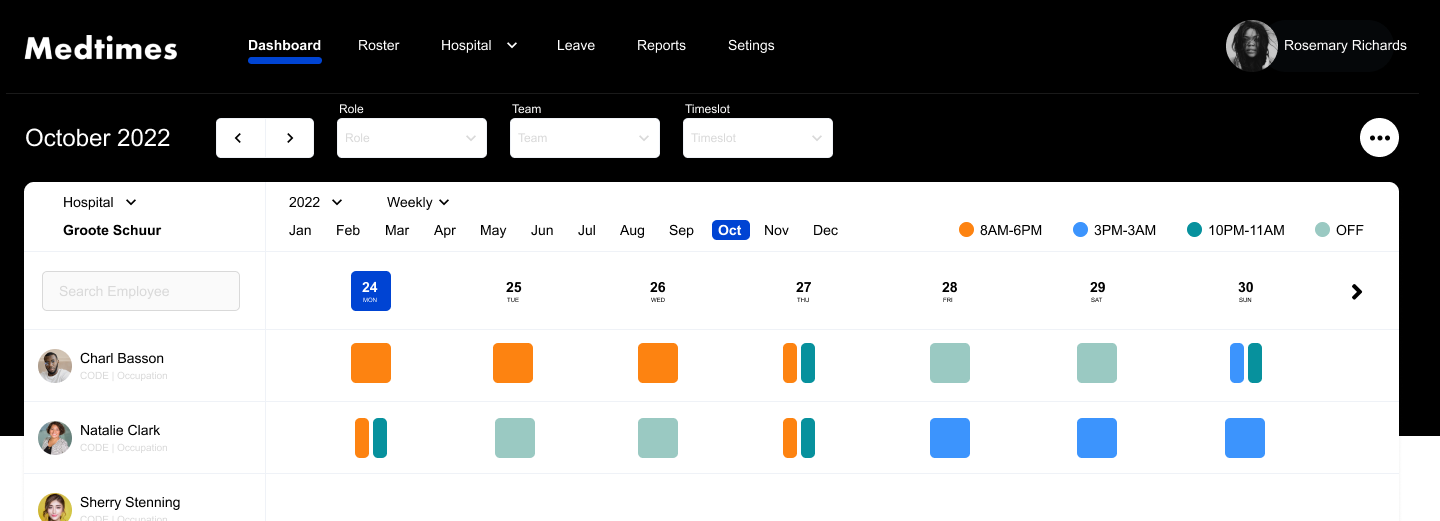
MedTimes a scheduling platform tailored for medical professionals at Groote Schuur Hospital in Cape Town. MedTimes was born out of the need to replace inefficient Excel-based scheduling with a streamlined, user-friendly solution. The platform allows doctors, interns, and other staff members to easily manage their calendars, swap shifts, book leave, and set up rosters. With its minimalist design and intuitive color-coded interface, MedTimes significantly enhances operational efficiency and user satisfaction, transforming the daily scheduling processes for the hospital staff.
Introduction
MedTimes is a platform designed to address the scheduling challenges faced by medical professionals at Groote Schuur Hospital in Cape Town. The hospital’s reliance on Excel sheets for managing doctors, interns, and other staff members’ calendars made it difficult to efficiently organize shifts, handle swaps, and track leave. I embarked on this passion project to create a user-friendly, streamlined solution. This case study delves into the design process, challenges, and solutions.
Problem Statement
Client: Individual Doctor at Groote Schuur Hospital, Cape Town
Challenges:
- Inefficiency in managing and viewing staff schedules.
- Difficulty in swapping shifts among staff members.
- Lack of visibility on staff availability for double shifts.
- Complexity in tracking leave and setting up rosters using Excel sheets.
Goals
The primary goal of MedTimes was to create a minimalistic, yet efficient platform that allows medical staff to:
- View their own and colleagues’ calendars.
- Book leave seamlessly.
- Set up and manage rosters for upcoming weeks.
- Quickly identify shift timings and availabilities through color-coded time slots.
Research and Insights
User Research:
- Conducted interviews with doctors, interns, and administrative staff to understand their pain points.
- Analyzed existing scheduling processes using Excel sheets and areas for improvement.
Key Insights:
- Medical staff need a quick and intuitive way to view and manage their schedules.
- There is a high frequency of shift swaps which need to be handled more efficiently.
- A visual representation of schedules would greatly enhance usability and reduce confusion.
Design Process
1. User Personas:
- Dr. John: Senior Doctor who needs to manage his complex schedule and oversee interns.
- Nurse Jane: Needs to view shifts and easily swap with colleagues.
- Intern Ian: Requires visibility on senior doctors’ availability for mentorship and double shifts.
2. User Journey Mapping:
Mapped out the typical user journey to identify touchpoints and pain points:
- Logging in to the platform.
- Viewing personal and team schedules.
- Requesting leave.
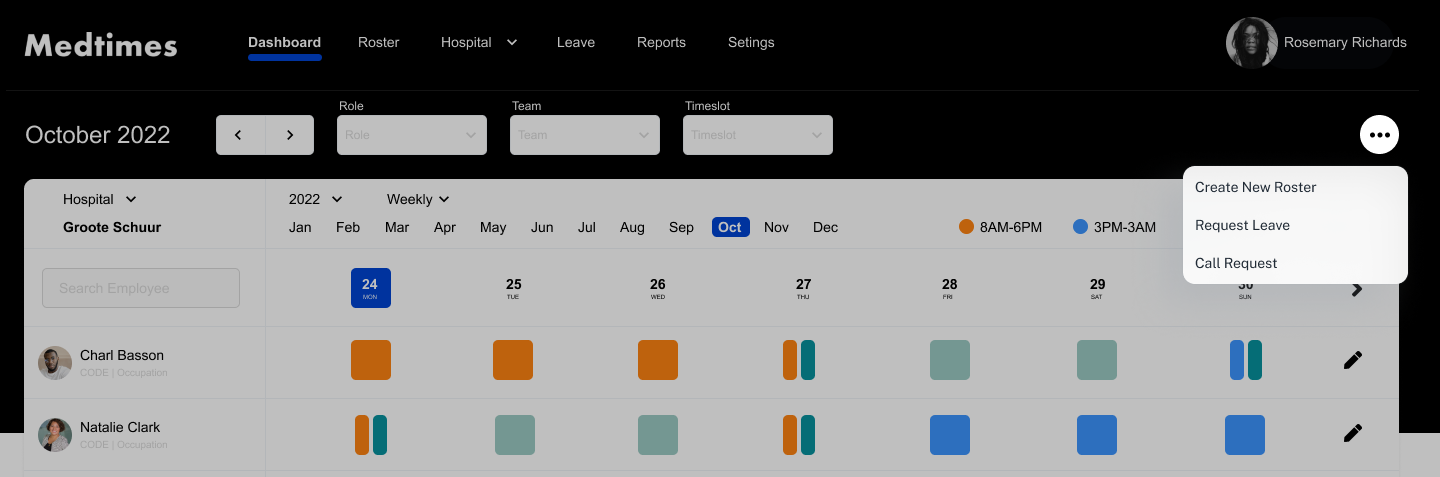
- Swapping shifts / Call Requests
3. Wireframing:
- Created low-fidelity wireframes to outline the basic structure and layout.
- Developed high-fidelity wireframes to refine the design and incorporate user feedback.
4. Usability Testing:
- Conducted usability tests with actual users from the hospital.
- Iterated the design based on feedback to enhance usability and functionality.
Design Solutions
1. Calendar View:
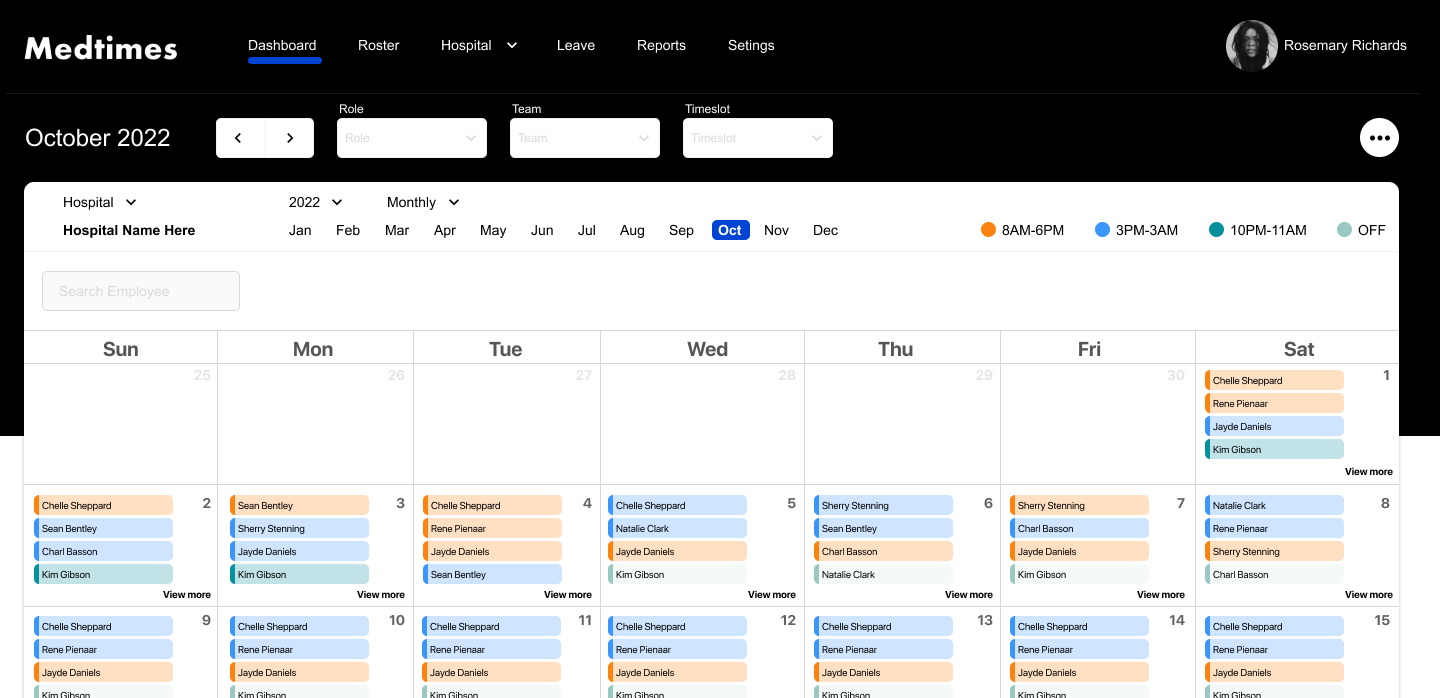
- Designed a calendar interface that displays individual and team schedules. Daily, Weekly & Monthly views.
- Implemented color-coded time slots to differentiate between shifts, leaves, and double shifts.
2. Leave Booking:
- Developed a simple leave booking system with an approval workflow.
- Provided visibility on leave balances and upcoming leaves.
3. Roster Setup:
- Enabled admins to set up rosters for upcoming weeks.
Visual Design
1. Minimalist Aesthetic:
- Choose a clean and minimalistic design to reduce cognitive load.
- Used a consistent color palette to enhance visual appeal and usability.
2. Color Coding:
- Applied distinct colors for different types of time.
- Ensured colors were easily distinguishable to cater to users with color vision deficiencies.
Conclusion
MedTimes successfully addressed the scheduling challenges at Groote Schuur Hospital by providing a user-friendly platform that streamlined shift management, leave booking, and roster setup. This project highlights the impact of thoughtful UX design in solving real-world problems and enhancing the daily workflows of healthcare professionals.